If you haven’t yet checked out the Math Teachers at Play 58 blog carnival, do so now. My favorite post was this one, about plotting families of curves in Geogebra. Beautiful!

stolen right from his blog!

If you haven’t yet checked out the Math Teachers at Play 58 blog carnival, do so now. My favorite post was this one, about plotting families of curves in Geogebra. Beautiful!
stolen right from his blog!
Has anyone ever considered designing a syllabus that reads like a glossy brochure? Check out this history professor’s blog post about his syllabus “extreme makeover.” Incredible!

From Hangen’s blog
Could it work with a math syllabus? I think so! Is it worth doing? Maybe. Not sure. But it does look like fun :-).
[HT: John Fea’s blog]
Maybe it’s old news to you, but I recently downloaded the Mathematics Add-In for Word and One-Note (download from Mircrosoft for free, right here). It works with Microsoft Office 2007 or later. It’s a super quick and easy installation–doesn’t require a reboot or anything. I was even able to install it at work on my locked-down limited-permissions account without needing administrative privileges.
I’m impressed with its ability to graph, do calculations, and manipulate algebraic expressions using its computer algebra system (CAS). It’s not as powerful as Mathematica or my TI-89, or even other free CAS like WolframAlpha or Geogebra (yes, Geogebra has a CAS now and it’s not beta!). But I like it because (A) my expectations were low and (B) it’s right inside Microsoft Word, and it’s nicely integrated into the new equation editor, which as you know, I love.

Here’s some sample output in word format or pdf (the image above is just the first little bit of this five-page document). All of the output in red is generated by the mathematics add-in package. In this document, I highlight some of it’s features and some of it’s flaws. The graphing capabilities aren’t very customizable. And the mathematics is a bit buggy sometimes.
All in all, despite its flaws, I highly recommend it! It’s really handy to have it right there in Word.
Have you heard of the “The Incompatible Food Triad” problem? This was first introduced formally here by George Hart (father of the now famous Vi Hart). Here’s the statement, taken straight from his website:
Can you find three foods such that all three do not go together (by any reasonable definition of foods “going together”) but every pair of them does go together?
Hart’s page is full of various suggested solutions, most of which are shot down in one way or another. It’s obviously not a rigorous mathematical question, since much of the success of a solution depends on culturally-defined taste. But it still doesn’t stop us from trying solutions.

pictured above: chocolate and strawberries on a waffle, one suggested pairing. just don’t you dare also add peanut butter!!
Here’s mine. My wife and I sat down to have waffles one weekend and we think we discovered an Incompatible Food Triad: chocolate, strawberries, and peanut butter.
But we found that all three did not taste good together on a waffle. A quick web search reveals that people do sometimes eat these three things together, but not on a waffle.Let me make a slightly more rigorous statement of my suggestion then: I claim (chocolate AND waffle), (strawberries AND waffles), and (peanut butter AND waffles) are an incompatible food triad.
Can you see how this is not a very mathematical/scientific question? 🙂
Would you agree with our incompatible food triad? Do you have any other suggested solutions?

Have you checked out this amazing, zoomable application that allows you to get a feel for the scale of the universe? Go there now. I think I checked this out a year or two ago, but these kids have updated it recently.
That’s right, I did say kids. This cool app was designed and programmed completely by two high school students in California. ABC News has a nice article about them.
I was teaching tabular integration yesterday and as I was preparing, I was playing around with using it on integrands that don’t ‘disappear’ after repeated differentiation. In particular, the problem I was doing was this:
Now this is done pretty quickly with only one integration by parts:
Let 


But I decided to try tabular integration on it anyway and see what happened. Tabular integration requires us to pick a function 


If I did everything right, then the infinite series that appears in the formula must be equal to 

Wow!! That’s pretty wild. It seemed like any number of infinite series could pop up from this kind of approach (Taylor series, Fourier series even). In fact, they do. Here are just three nice resources I came across which highlight this very point. I guess my discovery is not so new.
I think I’ll show this to my Algebra 2 class this week.
[HT: Fred Connington]
I come to you today with a recommendation for the book Fearless Symmetry by Avner Ash and Robert Gross. I started it this summer and finally had a chance to finish it over the Christmas break. I didn’t understand the last half-dozen chapters, but my dad did warn me that would happen. I wouldn’t even attempt reading it unless you’ve already been exposed to some undergraduate mathematics. But if you have, or if it’s been a while and you need a refresher, I highly recommend the book.

In the book, Ash and Gross attempt to explain some of the math underlying Wiles’ proof of Fermat’s Last Theorem. So you can understand why the math gets a bit hard at the end.
Along the way, you’ll get a very conversational, well-written, fun-loving introduction to the Absolute Galois Group of the Algebraic numbers. This is a group that is so complicated and messy and theoretical that we can only explicitly write down two elements of the group. In order to talk about it, we need representations, which the authors also introduce in a gentle way. In particular, we need linear representations.
Elliptic curves become very important too. I have studied elliptic curves in two of my classes before, but I really liked the way they introduced them here: We know everything about linear equations (highest exponent 1), and everything about conics (highest exponent 2 on x and y), but suddenly things become very interesting when we allow just ONE of the exponents (on x) to jump to 3. These are elliptic curves. Amazingly, you can define an arithmetic on the points of an elliptic curve that yield both a GROUP and an algebraic VARIETY. Incredible. Of course, the authors introduce what a variety is too.
After reading this, I also gained a much bigger view of abstract algebra–a course I’ve taken, but I found myself guilty of seeing the trees but not the forest. I loved the way Ash and Gross introduce the group SO3 and relate it to A4 with the rotations of a sphere inside a shell. Very nice visualization!
I could go on, but just know that there are lots of little mathematical gems scattered throughout this book. It’s a refreshing jaunt through higher-level mathematics that will demystify some of the smart-sounding words you’ve been afraid to ask about :-).
Go check it out!
As you know, Microsoft Office has a new and improved Equation Editor that ROCKS. It is so quick and easy and comes with many benefits. Check out my previous posts on Equation Editor here, here, and here to see why it’s so great.
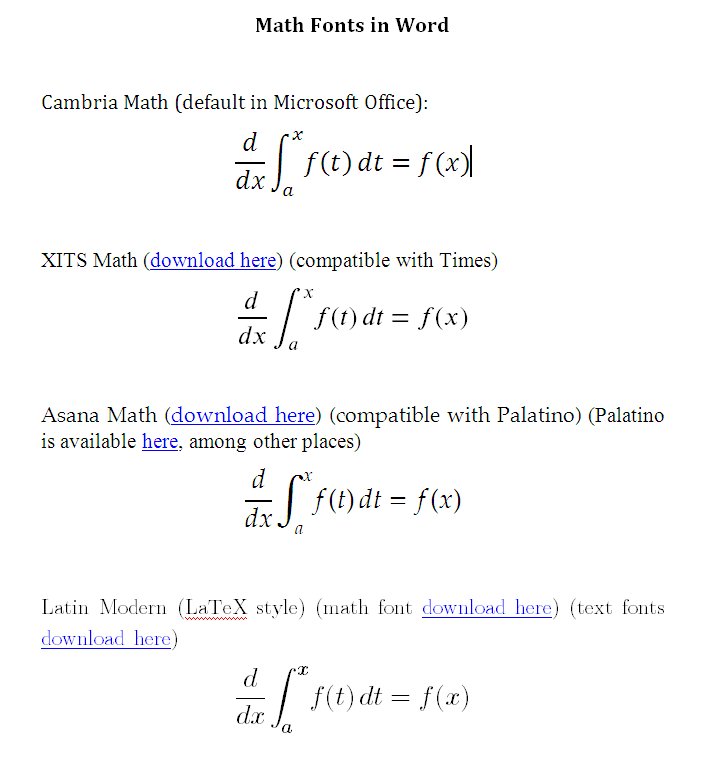
One issue everyone has with the new Equation Editor, however, is the limited ability to change the font typeface. The default that comes with word, Cambria Math, is nice but doesn’t suit everyone’s needs. If you’re typesetting a document with a font other than Cambria, then it looks a little weird to have your equations in a different font.
After some extensive research, I’ve found three other nice fonts that work with Microsoft Office’s new Equation Editor (these are compatible with Office 2007 or later):
To illustrate what these fonts look like, I’ve taken a screenshot below, and I’ve also uploaded the doc file and the pdf file. The doc file won’t render correctly on your machine, however, unless you actually download all the aforementioned fonts.
I hope this helps those who have been searching for alternative fonts for Microsoft Equation Editor. In the comments, please let me know if you find others!
Online Emulator
Check out this online TI-83 Plus emulator! This just came across my radar from Hackaday.

It requires that you upload a (legally acquired) rom, but once you do, this seems like it would be a very good ‘on-the-go’ resource for presentations, teaching, or just any other time and place when you might need at graphing calculator.
I don’t have a TI-83 plus rom lying around, and I tried a regular TI-83 rom (which I did happen to have) but it didn’t seem to work for me. Hmm.
Mobile Devices
[updated] I now recommend Wabbitemu as the best emulator on the computer and for Android devices. It accepts a very wide range of rom files and has a nice feature set. The whole process is pretty user friendly. Here’s a link to the app in the Google Play store and here’s their website where you can download the desktop app.
Another great emulator for Android is Andie Graph which can be obtained in the following way (instructions come from our student, Jim Best):
Jim also suggests this calculator if you have an Apple product:
There is an app that is a type of TI-83. It is called RK-83 on the app store for apple products such as the iPhone and iPod touch. This is a $0.99 app that has the same functionality as a TI-83. It does not have the best of reviews but for $0.99, its worth a shot. There is also an app by the same creator that has better reviews but it is an 89.
Of course, there are scads of other great calculators out there if you’re willing to give up the look and feel of the TI experience. Desmos is a popular choice and works nicely on all platforms but isn’t a powerhouse of a calculator.
Plain-old Software
And as far as plain-old desktop software goes, here are some great emulators:
I actually prefer the Wabbitemu and Rusty Wagner emulators to the TI-SmartView emulator, even though our school has purchased copies for all of the math teachers.
Rom Files
In almost all the above cases, you’ll need to obtain a rom file for the calculator you’re interested in emulating. This is like the brains of the calculator. The emulator is just the pretty buttons and interface that run on top of the rom.
To obtain the rom file for your calculator, follow the instructions at ticalc.org here. I actually preferred using the instructions here for my TI-84 Plus SE. You can create your own rom file, or you can try to hunt for a download somewhere. This page has a bunch of downloads, but it’s not comprehensive. Remember that, legally, you must own the physical calculator if you download and use one of these rom files.





 Random Walks