
The view through a tennis racket
Reply

Mr. Scott hits another one out of the park!
Yes, that’s right!

In just a few weeks, I’ll be hosting the 87th Carnival of Mathematics. Please submit articles here, sometime before June 1st. I look forward to curating the submissions, and of course, sharing some great mathematics with the math blogging community!
And if you haven’t done so yet, please go check out the current carnival at the Math Less Traveled.
To get you in the carnival mood, here’s a juggling video. See if you can spot Mr. Chase :-).
In fact, today, I just gave the “Mathematics of Juggling” lecture three times. I try to give this lecture as a fun-day at the end of the year in my Precalculus classes. So, needless to say, I’m in the juggling mood!
A few people have pointed me to this mathy web comic:
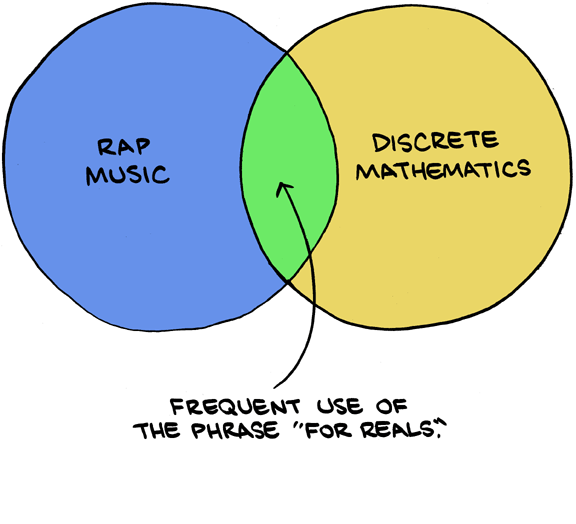
Thanks to smbc-comics for a great mathy web comic! (http://www.smbc-comics.com/comics/20120517.gif)
I’m not sure how often discrete mathematics uses the phrase “for reals”….I would think “for natural numbers” would be more appropriate, don’t you?
Happy Birthday to Mr. Chase, today!
Today, I think I can safely say, is the last time my age will be a perfect number. The last time my age was perfect was when I was 6 years old. For those that forget the definition of a perfect number:
A number is perfect if it is the sum of its proper divisors (that is, the sum of its divisors, excluding itself).
For example, 6 is perfect because 1+2+3=6.

I’m not 6. How old *am* I?
So, how old am I?
If you’re a consummate mathematician, you have the first couple perfect numbers memorized, and this is an easy question. If you’ve never thought about perfect numbers, or you forget what the next one is, I challenge you to figure it out for yourself. I challenged my students today to figure out my age, and two of them got it out without my help.
For a real challenge, prove that there are infinitely many perfect numbers. (open problem!)
Here is some awesome baby gear that you’ll get a kick out of, whether you have a little baby (like I do) or not. [ht: Carrie Gaffney]
Check out this one, for instance, perfect for the little Fermat in your life:

Or this one, with a slightly more ‘physics’ flavor–perfect for your little one that is constantly gaining momentum:

For the baby that’s two standard deviations above the mean:

Or how about this …

And here are some more for you:
By the way, the perfect place to collect random photos and other things you love is on Pinterest. I’ve been collecting pins for the last year or so, and you may want to check out these two boards of mine, at least:
Happy pinning!
I have posted twice about Microsoft Equation Editor recently, and made comparisons to 
I was talking with my good friend (and math professor) Matthew Wright, and I echoed the above sentiment. I said that I’m seeing less and less advantage to doing things in
As much as I appreciate the improvements to Equation Editor, I can think of many reasons to use LaTeX. Here are some:
1. Math fonts: I like to use Palatino, but Word doesn’t support Palatino as a math font. Equation Editor defaults to some particular font, and I don’t know how to change the default setting. In order to use Palatino in equations, I have to convert my equations to “normal text”, but that removes the italics and some other equation formatting, so I then have to manually set the variables to be italics. I like to use a sans-serif font for presentations in PowerPoint, but that also requires a lot of manual font changes. LaTeX can specify all the fonts in the document by loading a single package.
2. LaTeX provides more symbols. The Equation Editor cheat sheet provides an impressive list of symbols, but it doesn’t come close to the amount of symbols available in LaTeX. The Comprehensive LaTeX Symbol List has 100 pages of symbols:
http://www.tex.ac.uk/tex-archive/info/symbols/comprehensive/symbols-letter.pdf
3. LaTeX supports some programming constructs, such as conditional statements and the ability to create new commands. For instance, if you use some expression repeatedly, you can define a new command so that you can easily insert your expression whenever you need it. Conditional formatting is useful to hide or print solutions in a worksheet, for example.
4. LaTeX numbers theorems and equations and lets you refer to them in your document. If you insert a theorem or equation, it automatically renumbers everything. The same applies for lemmas, definitions, chapters, sections, references, etc. (I know that Word has tools for cross-references, table of contents, and such, but I think consistent numbering of theorems and equations is easier in LaTeX.)
5. There are many special packages in LaTeX for a variety of tasks. For example, I use a schedule package to print my schedule each semester. Granted, this did not save time the first time I made a schedule, but saves me time now, since creating a schedule is really easy. I have attached my schedule.
6. Finally, I think that math looks better in LaTeX than in Word. This is subjective, but I like Donald Knuth’s Computer Modern font family.
I guess I knew all of that, but I was glad for his reminders of why
7. Geek cred 🙂
Do you have any to add?
As some of you know, I recently posted about Microsoft Equation Editor (here) and the way it’s been totally upgraded. I’ve been using Microsoft’s Equation Editor more and more, and I’ve learned a lot of new things, but I also still have questions (for instance, how do you force it to do display or in-line mode?).
Before, when I had questions, it seemed like Microsoft had no answers. I searched their website and found minimal help. I found help from third-parties, like this wonderful cheat-sheet which I still highly recommend. But today when I went searching for some more answers, I found this page on Microsoft’s website, which I swear wasn’t online two months ago.
The most interesting thing is that they mention their use of Unicode Nearly Plain-text Encoding of Mathematics and they claim that the Microsoft Equation editor adheres to the standards set forth in Unicode Technical Note 28. I’ve now completely read this Unicode guide and it was very helpful.
I think I can finally use the new Microsoft Equation Editor without ever leaving the keyboard.
In particular, here are a few things I learned how to do. Hopefully this will save you the time of having to read through it all yourself:
To start with, here are a handful of things I didn’t know how to do without visiting the toolbar. Now I can do them just by typing.
Boxed formula: \rect(a/b) produces

Matrix: (\matrix(a&b@&c&d)) produces

Radicals: \sqrt(5&a^2) produces

Equation arrays are something I found hard to do in Microsoft Equation Editor. In their documentation, I learned you can type “Shift+Enter” to keep the next line as part of the same equation array. But here’s the more finely-grained method:
\eqarray(x+1&=2@1+2+3+y&=z@3/x&=6)
resolves to this:

A more complicated example of alignment, and a description of how it is interpreted comes from the Unicode page:
3.19 Equation Arrays
To align one equation relative to another vertically, one can use an equation array, such as
which has the linear format █(10&x+&3&y=2@3&x+&13&y=4), where █ is U+2588. Here the meaning of the ampersands alternate between align and spacer, with an implied spacer at the start of the line. So every odd & is an alignment point and every even & is a place where space may be added to align the equations. This convention is used in AmSTeX.
Instead of █, one can type \eqarray in Microsoft office. Also, to include a numbered equation is simple: E=mc^2#(30).
Another nice thing I learned is how to quickly include text in your equations, without having to visit the toolbar (in retrospect, it’s somewhat obvious):
“rate”=”distance”/”time”
resolves to
Like I said, one unresolved issue I still have is how to force math to be displayed in ‘in-line’ or ‘display’ mode. This is very easy in
Note that although there’s no way to specify display versus inline modes (TeX ‘s $ versus $$), a useful convention for systems that mark math zones is that a paragraph a paragraph consisting of a math zone is in display mode. If any part of the paragraph isn’t in a math zone including a possible terminating period, then inline rendering is used.
So there you have it–more of what I’ve learned about the Microsoft Equation Editor. Please do share if you have other useful information.
I feel like I need to post about this too–just to get the word out.
At first I thought it was funny, but now it just makes me angry. I first heard about this paper thanks to my brother, Tim Chase, who shared this news via Retraction Watch. Then today I learned a bit more information by way of Alexander Bogomolny and his blog.
Okay, what’s going on? Authors M. Sivasubramanian and S. Kalimuthu have published this completely nonsensical math paper, and here’s what Retraction Watch had to say:
Have a seat, this one’s a howler.
According to a retraction notice for “Computer application in mathematics,” published in Computers & Mathematics with Applications:
This article has been retracted at the request of the Publisher, as the article contains no scientific content and was accepted because of an administrative error. Apologies are offered to readers of the journal that this was not detected during the submission process.
Go read the whole paper in full text available here. At the very least, this paper has been retracted. That’s good.
But sadly, S. Kalimuthu and his coauthors are responsible for many other terrible papers too (seriously, go check them out!). How does this happen? Can anyone explain it? And why hasn’t he been stopped?
In one paper in particular, he has completely plagiarized Alexander Bogomolny’s site–as one commenter noticed. Check out Alexander’s blog CTK Insights for his coverage.
Like I said, this man needs to be stopped.
.

By now perhaps you’ve seen this floating around the internet. It was reported here and here and here and here, at least.
Physicist Dmitri Krioukov got a $400 ticket for not making a full stop at at stop sign. He wrote a paper explaining why the police officer could have been wrong, went to court, and got the fine lifted.
If you haven’t read the paper, I encourage you to do it. It’s fairly short and only requires knowledge of a Calculus. Here is a direct link to the pdf. Here’s the abstract:
We show that if a car stops at a stop sign, an observer, e.g., a police officer, located at a certain distance perpendicular to the car trajectory, must have an illusion that the car does not stop, if the following three conditions are satisfi ed: (1) the observer measures not the linear but angular speed of the car; (2) the car decelerates and subsequently accelerates relatively fast; and (3) there is a short-time obstruction of the observer’s view of the car by an external object, e.g., another car, at the moment when both cars are near the stop sign.
What do you think? Is Professor Krioukov just trying to buffalo the court, or does he have a legitimate case? I guess if there’s any doubt at all about his guilt, then he should be forgiven the fine. And that’s what the court did rule.
However, there is one particular assumption that he makes which is absolutely way-off (look at the paper and notice the key on Figure 3, labeling the blue curve). But the court certainly didn’t catch that. Like I said, he may have been trying to pull the wool over the eyes of the court with lots of math and physics.
Despite the fact that he published his paper on April 1st, I do think this story is true. Like I said, though, the paper does contain an error. So despite all of his good effort, I think he should have been given the ticket. The court didn’t notice it, but he pulled a fast one on them! (pun intended!)


 Random Walks